The Phomemo M120 Label Maker review is for shoppers who need a portable printer for barcodes, addresses, product tags, and everyday organization.
Its adjustable 20–50 mm label support and phone or PC connectivity make it a flexible fit for small-label tasks.
Phomemo M120 Review Summary
The quick verdict
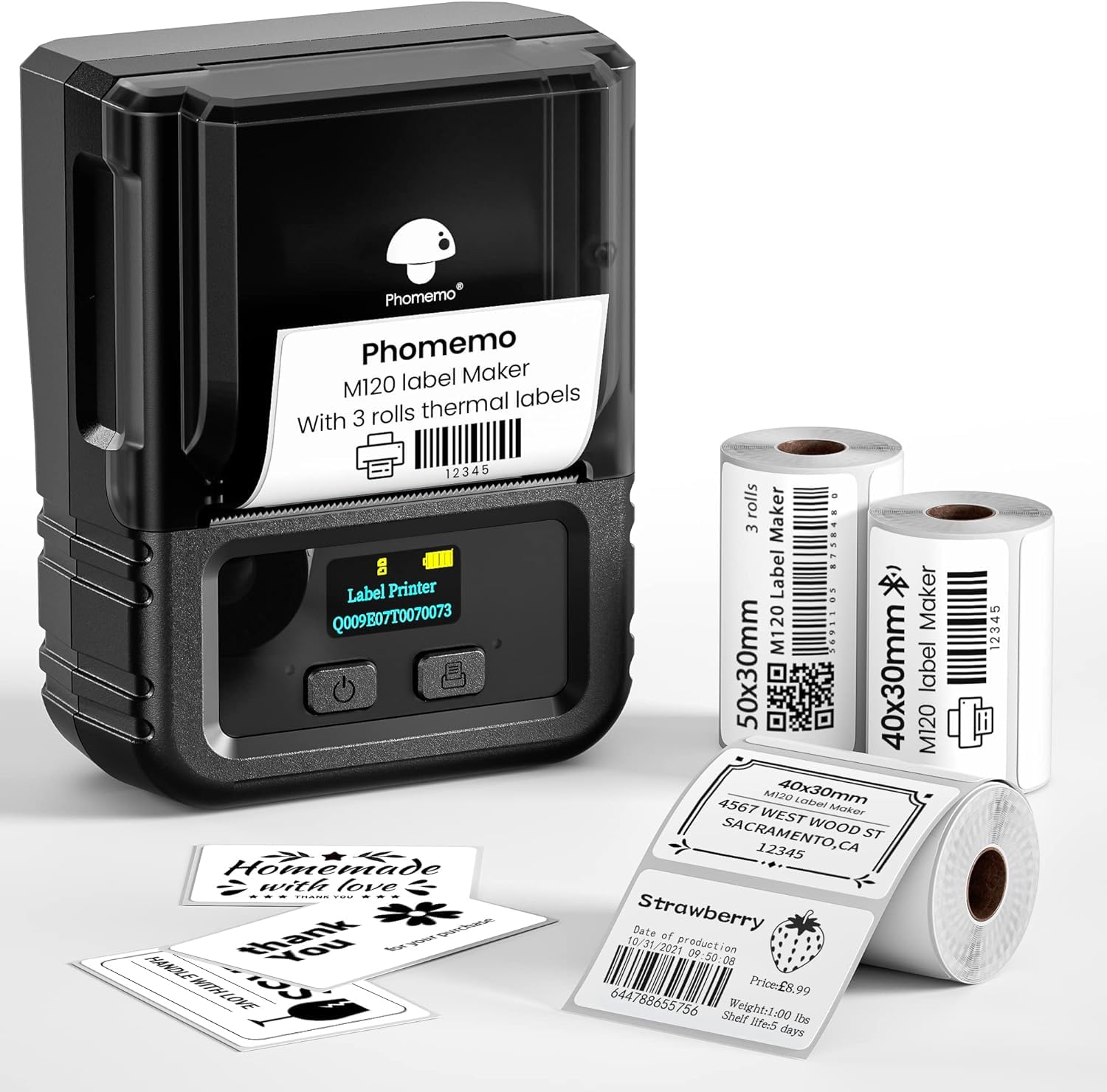
1,000+ ratings
Read Amazon ReviewsPhomemo M120
A compact thermal label printer for home organizers and small businesses that want app-based design, flexible label widths, and phone or PC printing.
- Direct thermal printing produces monochrome labels without ink or toner.
- Adjustable paper slot supports label widths from 20 to 50 mm; the supplied rolls include two 40 × 30 mm rolls and one 50 × 30 mm roll.
- Bluetooth printing works with iOS and Android devices through the Print Master app.
- PC printing is available over USB with Labelife software and a step-by-step setup guide.

Pros
- Lightweight and rechargeable, with a stated capacity of up to 3,000 labels per charge.
- Works with both mobile devices and PCs, providing wireless and USB workflows.
Consider before buying
- The 20–50 mm width range is aimed at compact labels and does not cover common 4 × 6 inch shipping labels.
- PC printing depends on a USB connection and Labelife software, while mobile printing uses the Print Master app.
Read the full review summary
The Phomemo M120 combines a compact, rechargeable design with direct thermal printing, so routine label making does not require ink or toner.
It can print from iOS and Android over Bluetooth, or connect to a PC by USB, giving users a choice between quick mobile jobs and a desktop workflow.
Its strongest case is variety: the adjustable slot covers label widths from 20 to 50 mm, while the Print Master app offers templates, symbols, fonts, voice input, and image text recognition.
That range suits small businesses, crafters, and households making many kinds of compact labels. It is designed for narrow labels rather than full-width shipping labels, so check your required label dimensions before choosing it.
The buying factors
Phomemo M120 Scorecard
Editorial scores reflect listed features and buyer fit; they are not laboratory measurements or customer ratings.
Label-width flexibility
The adjustable slot supports label widths from 20 to 50 mm, covering a broad range of compact labeling tasks.
Mobile and PC access
Bluetooth printing supports iOS and Android, while USB provides a PC connection through Labelife software.
Design tools
The app lists extensive templates, symbols, fonts, multiple languages, and voice and image recognition.
Portability
At 200 g, the printer is light enough to carry in a bag or pocket.
Consumable simplicity
Direct thermal printing removes ink and toner from the routine, though thermal labels are still required.
Labeling versatility
The described uses span barcodes, addresses, pantry labels, storage tags, and small-business labeling.
Key Features and Specifications of Phomemo M120
- Direct thermal printing produces monochrome labels without ink or toner.
- Adjustable paper slot supports label widths from 20 to 50 mm; the supplied rolls include two 40 × 30 mm rolls and one 50 × 30 mm roll.
- Bluetooth printing works with iOS and Android devices through the Print Master app.
- PC printing is available over USB with Labelife software and a step-by-step setup guide.
- Print Master includes voice and image recognition, plus more than 7,900 symbols, 1,900 templates, 550 fonts, and support across 20-plus languages.
- The 200 g design is rechargeable, with the product description specifying up to 3,000 labels per charge and an auto-sleep mode after five minutes of inactivity.
Pros and Cons of Phomemo M120
Pros
- Lightweight and rechargeable, with a stated capacity of up to 3,000 labels per charge.
- Works with both mobile devices and PCs, providing wireless and USB workflows.
- Adjustable width and included label rolls make it ready for several small-label formats.
- A broad set of app templates and text-entry tools can speed up repeated or customized label creation.
Consider before buying
- The 20–50 mm width range is aimed at compact labels and does not cover common 4 × 6 inch shipping labels.
- PC printing depends on a USB connection and Labelife software, while mobile printing uses the Print Master app.
- Thermal label supplies are still needed, and the description recommends Phomemo thermal labels for best performance.
Who Should Buy Phomemo M120?
Good fit
Consider the M120 if your labeling routine ranges from pantry and storage tags to product barcodes or address labels, and you want to create those labels from a phone or computer.
The adjustable slot and included rolls provide a useful starting point for compact formats.
It may also suit a small seller or crafter who makes varied designs. The app’s templates, symbols, fonts, and recognition tools offer several ways to create labels, while thermal printing avoids keeping ink or toner on hand.
For mobile work, its low weight and rechargeable design are convenient qualities. If you expect substantial printing away from a desk, compare your typical label volume with the stated up-to-3,000-label charge figure and keep suitable thermal rolls available.
Who should skip it
Skip this model if your routine requires standard 4 × 6 inch parcel labels; its supported label width is only 20–50 mm.
Also consider another workflow if you need a standalone desktop process without a phone app or software setup.
How the Phomemo M120 Label Maker fits everyday labeling
A useful width range for compact jobs
The 20–50 mm slot range accommodates small tags for jars, files, products, and addresses.
The adjustable slot and sizing guide are intended to simplify calibration when changing formats, but buyers should match the roll width and label length to each job before printing a batch.
Two ways to create and send labels
Mobile users can design in Print Master and send jobs by Bluetooth; PC users can use USB with Labelife.
This division supports both quick phone-based edits and desktop preparation, though it means choosing the relevant app and connection for the device in use.
App tools for repeat and custom designs
The app’s templates, large symbol and font libraries, voice recognition, and OCR can help when labels need more than plain text.
For repeated inventory or address work, these tools may reduce manual entry; buyers should explore the app’s design flow to ensure its available templates match their preferred format.
Portable thermal printing in context
The 200 g weight and rechargeable battery suit occasional printing around a home, craft area, or small business.
Thermal printing eliminates ink and toner, but it still relies on compatible label rolls; checking supply sizes and the label surface needed for a particular use is a sensible part of planning.
Alternatives to Phomemo M120
Desktop Label Printers alternative

6,000+ ratings
Read Amazon ReviewsPhomemo M110
Choose the M120 if its Print Master app tools and specified cross-platform USB workflow appeal to you.
The M110 may suit buyers who prefer its listed roll assortment and mobile Bluetooth workflow; check its PC compatibility details before selecting it for computer-based printing.
- The M110 description also specifies 20–50 mm labels and thermal printing, with Bluetooth printing for Android and iOS.
- Its listed package includes 40 × 30 mm, 50 × 30 mm, and 50 × 80 mm rolls.
- The M120 combines 20–50 mm label-width support with Bluetooth phone printing and USB PC printing.
Desktop Label Printers alternative

700+ ratings
Read Amazon ReviewsPhomemo M220
Consider the M220 if you want a wider label-format range than the M120 provides and prefer to stay with Phomemo’s mobile and USB workflow.
The M120 is the more compact-width fit when your work stays within 20–50 mm labels.
- The M220 supports labels from 0.78 to 3.14 inches wide, with Bluetooth for phones and tablets and USB for PCs.
- Its description explicitly says it cannot print 4 × 6 inch shipping labels.
- The M120 supports labels up to 50 mm wide and is designed for compact label formats.
Is Phomemo M120 Worth It?
The Phomemo M120 is worth considering for compact, varied labeling at home or in a small business.
Its combination of adjustable label widths, mobile and PC printing, extensive app tools, and low carry weight covers more workflows than a phone-only label maker.
Before buying, confirm that 20–50 mm labels fit your tasks and that the app-and-connection setup suits your devices. If those conditions match, the M120 offers a practical, ink-free approach to everyday labels.
Your review at a glance
1,000+ ratings
Read Amazon ReviewsPhomemo M120
A compact thermal label printer for home organizers and small businesses that want app-based design, flexible label widths, and phone or PC printing.
- Direct thermal printing produces monochrome labels without ink or toner.
- Adjustable paper slot supports label widths from 20 to 50 mm; the supplied rolls include two 40 × 30 mm rolls and one 50 × 30 mm roll.
- Bluetooth printing works with iOS and Android devices through the Print Master app.
- PC printing is available over USB with Labelife software and a step-by-step setup guide.